High-Level View of H.265 Compression Steps

H.265 (HEVC) is a video compression standard that delivers roughly the same quality as H.264 at half the file size. What are the basic steps taken by the H.265 codec to compress a sequence of frames? What are some of the reasons that H.265 provides 50% better compression than H.264?
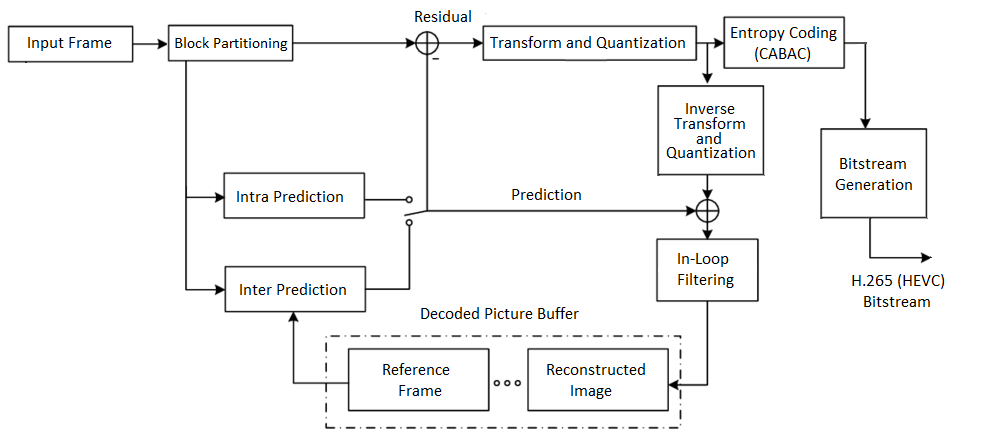
This article covers topics such as coding blocks, intraprediction, interprediction, quantization and entropy coding. It is the second installation of the series Deep and shallow dives into topics related to H.265. You can read the first one here.
When compressing video into H.265, a whole gang of parameters can be set to customize the compressed video stream. If you are unfamiliar with video compression concepts, a lot of these parameter names probably sound alien. Here are just a few:
log2_min_luma_coding_block_size_minus3constrained_intra_pred_flaglog2_min_luma_transform_block_size_minus2init_qp_minus26entropy_coding_sync_enabled_flag
By the end of this article you will have a better idea of what these specific parameters describe, and discover some clever techniques H.265 uses to compress video! Vamos!
Related articles: H.264 Vulkan Video Encoding, H.265 Vulkan Video Encoding, Debugging Strategies, Color Science From the Purview of H.265
The Blocks
Something that came up a lot as I scanned through the H.265 parameters was something block: coding tree block, coding block, prediction block, transform block. What are these blocks?
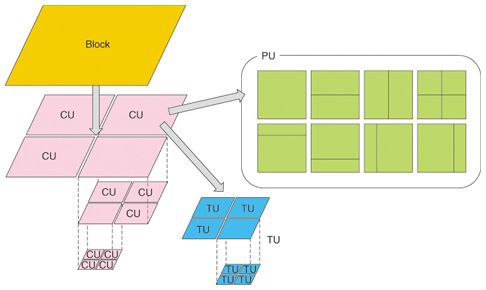
H.265 is encoded in blocks of pixels. It uses at the macro level, coding tree blocks, or CTBs, which can go up to 64x64 pixels. CTBs can be recursively subdivided into smaller coding units, or CUs, using a quadtree structure. A coding unit is a thin layer (containing some metadata, e.g. prediction mode, motion vectors) over the chroma/luma coding blocks which contain the actual rectangular block of pixel data.
H.264 on the other hand encodes in 16x16 pixel macroblocks, which can be subdivided into smaller blocks. This is one of the reasons why H.265 outperforms H.264, especially for 4k video, since it becomes more efficient to encode in 64x64 blocks.
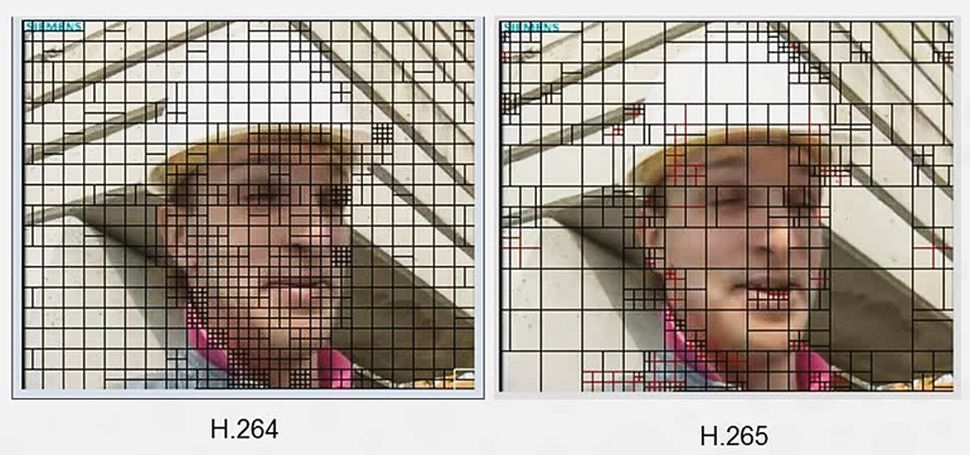
To recap. in H.265 we have, hierarchy wise:
Coding Tree Block (16×16, 32×32, or 64×64):
Coding Unit (8×8, 16×16, 32×32, 64×64):
-
thin layer over the coding blocks containing metadata (e.g. prediction mode)
-
contains 3 coding blocks (one for luminance (Y) and two for chromaticity (Cb and Cr))
-
size defined by
log2_min_luma_coding_block_size_minus3Coding Block (same sizes as Coding Unit):
- holds the actual sample pixel data (this can be straightforward luma/chroma data, or it can be luma/chroma data after having undergone prediction and transformation, see prediction and transform blocks)
Finally we have the prediction units and the transform units. Consider these to be views of the actual coding block pixel data which give some metadata on how to interpret it, if the block was compressed with prediction and transform coding. As shown in the diagram below, the same coding unit can have different partions of PUs and TUs which describe different subblocks of the same CU.
Prediction (Intraprediction, Interprediction)
H.265 uses prediction to compress blocks. Prediction creates estimates of pixel values based on other pixels. There are two types of prediction:
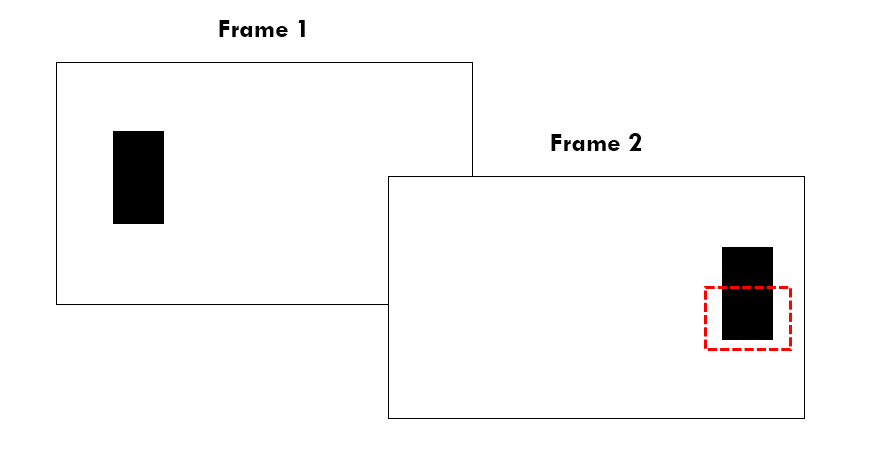
In the example above, we could use interprediction or intraprediction to compress the block circled in red in frame 2.
- Interprediction: I can find the matching block in frame 1. It appears to have moved by a distance of approximately the frame’s width. This movement gives us the motion vector.
- Intraprediction: The block above the red one in the same frame has similar pixel values. We can use this as the basis for prediction and store the residual values (the deltas) within the block. These values will be closer to 0, and so will benefit from the next compression steps.
IDR frames, P frames, B frames
There are different types of frames in H.265:
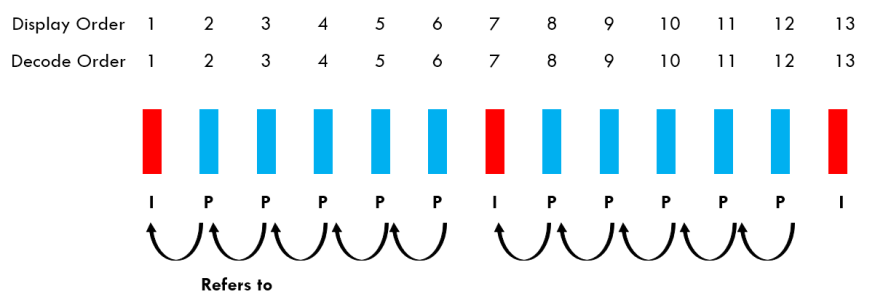
- IDR frame (or I Frame)
- only uses intraprediction
- these are standalone frames, they do not depend on past or future frames to be decoded
- the first frame of a video stream is always an IDR frame
- P Frame
- use intraprediction and interprediction
- may use past frames as a reference to be decoded (because of interprediction)
- B Frame
- Similar to P Frames but may also refer to future frames to be decoded. B stands for bi-directional
During the encoding/decoding process, the decoded picture buffer (or DPB) is a memory buffer that stores decoded pictures for use as references. pDecPicBufMgr in the SPS and VPS holds parameters related to it (like how many pictures it can store).
Reconstructed images are fully decoded pictures that exactly match what the decoder produces. They may be needed for producing P and B frames during the encoding process. Reference frames is the term for the reconstructed images stored in the DPB used for interprediction of the current frame.
The other steps to encoding
Looking at the diagram above, there are a few concepts which I haven’t covered, namely Transform, Quantization, and Entropy Coding.
Without getting into the weeds of it all, for each concept I’ll provide a simple high level explanation and then show a concrete example of a 8x8 block of pixels undergoing all these forms of compression. Know that the end goal is to transform as many pixels into 0’s as possible as this makes the binary file extremely compressible using entropy coding.
Transform Coding
Transform coding is the process of converting pixel data from the spatial domain into the frequency domain (usually using DCT - Discrete Cosine Transform). This helps separate the image information into different frequency components that can be compressed more efficiently.
Quantization
Quantization reduces precision of the transformed coefficients. It's like rounding numbers but with variable precision based on how visible the changes would be. This is where most of the actual compression happens, by reducing the precision of values that humans are less likely to notice.
Entropy Coding
Entropy coding is the final stage where the actual bitstream is created. It assigns shorter binary codes to more common values and longer codes to rare values (like Huffman coding or CABAC in H.265). No actual video information is lost here - it's just efficient binary packing.
An example of a block getting compressed
To better illustrate how it all works, here is a concrete example of a 8x8 block going through all the steps.
- Original 8x8 Block (example pixel values 0-255):
128 130 129 127 125 128 130 128
129 128 127 126 127 129 131 129
127 126 125 124 126 128 130 128
125 124 123 122 125 127 129 127
126 125 124 123 126 128 130 128
128 127 126 125 127 129 131 129
130 129 128 127 128 130 132 130
129 128 127 126 127 129 131 129
- Intra Prediction: Let's say it uses the mode that predicts from pixels above (vertical mode), the prediction would be:
128 130 129 127 125 128 130 128 (copied from above row outside block)
128 130 129 127 125 128 130 128
128 130 129 127 125 128 130 128
128 130 129 127 125 128 130 128
128 130 129 127 125 128 130 128
128 130 129 127 125 128 130 128
128 130 129 127 125 128 130 128
128 130 129 127 125 128 130 128
- Residual (Original - Prediction):
0   0   0   0   0   0   0   0
1  -2  -2  -1   2   1   1   1
-1  -4  -4  -3   1   0   0   0
-3  -6  -6  -5   0  -1  -1  -1
-2  -5  -5  -4   1   0   0   0
0   -3  -3  -2   2   1   1   1
2   -1  -1   0   3   2   2   2
1   -2  -2  -1   2   1   1   1
- Transform (DCT) of Residual (simplified example values):
-12  8   0   1   0   0   0   0
 6  -4   1   0   0   0   0   0
 2   1   0   0   0   0   0   0
 1   0   0   0   0   0   0   0
 0   0   0   0   0   0   0   0
 0   0   0   0   0   0   0   0
 0   0   0   0   0   0   0   0
 0   0   0   0   0   0   0   0
- Quantization (with example quantization parameter): Divides coefficients by quantization step size and rounds:
-2   1   0   0   0   0   0   0
 1   0   0   0   0   0   0   0
 0   0   0   0   0   0   0   0
 0   0   0   0   0   0   0   0
 0   0   0   0   0   0   0   0
 0   0   0   0   0   0   0   0
 0   0   0   0   0   0   0   0
 0   0   0   0   0   0   0   0
- Entropy Coding: The quantized coefficients are then scanned in a zig-zag pattern and encoded into the bitstream using CABAC (Context-adaptive binary arithmetic coding). The result would be a binary string that efficiently represents the pattern of these values, with shorter codes for more common values.
In this example, most high-frequency coefficients became zero after quantization, which is typical and helps achieve compression. The decoder will reverse these steps to reconstruct an approximation of the original block. Et voilà!